
Table of Contents
Free trial IPTV is exactly what it sounds like: a short window where you get full or partial access to an IPTV service before spending a single dollar. Think of it the way you would test-drive a car. No matter how good the brochure looks, you would not hand over your money without sitting behind the wheel first.
The problem is that most people do not use that trial period well. They log in, flip through a few channels, and call it good. Then two weeks after paying for a full subscription, they discover the sports channels buffer every ten minutes, or the on-demand library is half empty, or customer support takes three days to respond.
A free trial IPTV subscription is a genuine opportunity to make a smart decision, but only if you know what to actually look for. The seven tests below are designed to help you avoid those frustrating surprises. And yes, we offer a free trial right here, so you can put all of this into practice immediately.
Free Trial IPTV: 7 Things You Should Always Test First
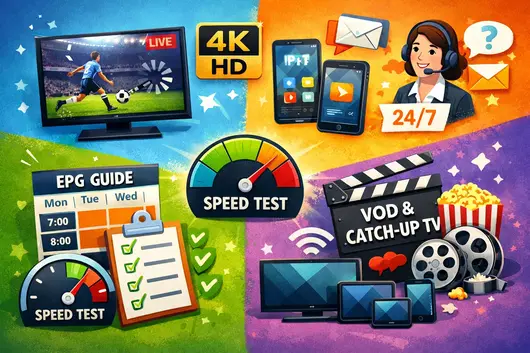
1. Channel Count vs. Channel Quality
Every IPTV provider will tell you they have thousands of channels. The number sounds impressive until you start scrolling and realize that hundreds of them are shopping networks in languages you do not speak, or dead links that go nowhere.
During your free trial IPTV period, do not count channels. Watch them.
Pick five or ten channels you actually care about. Maybe that is local news, a couple of sports networks, and a few entertainment options. Open each one, let it run for at least three to five minutes, and pay attention to whether the image is sharp, whether the audio matches the picture, and whether the stream holds without stuttering.
A provider that offers 10,000 channels but cannot reliably deliver the twenty you actually want is not a good deal at any price.
What to check: do the channels you care about load within a few seconds, is the image quality consistent, and are there obvious placeholder or dead channels padding the count.
2. Streaming Stability and Buffering
Buffering is the number one complaint among IPTV users. That spinning wheel in the middle of a game or a season finale is not just annoying. It is a signal that something is wrong, whether that is the service’s infrastructure, your internet connection, or the combination of both.
During your free trial IPTV subscription, run a deliberate stress test.
Watch live TV during peak hours, which in the US typically means weekday evenings from around 7 PM to 10 PM, and on Sunday afternoons during football season. These are the moments when a provider’s servers are under the most load. A service that runs smoothly at 2 PM on a Tuesday but chokes during prime time is one that will disappoint you regularly.
Also test on a night when there is a major live event. Big sports games, award shows, or news events push streaming infrastructure hard. A quality provider with solid servers handles these moments without issue.
3. Video and Audio Quality
Not all HD is created equal. Some providers label streams as HD when they are delivering something closer to upscaled standard definition. During your free trial IPTV period, take a close look at actual picture quality, not just what the channel listing claims.
If you have a 4K television, check whether there are genuine 4K streams available and whether they actually deliver the sharpness you expect. On a 1080p screen, true Full HD should look crisp, with clear detail in faces and backgrounds.
Audio sync is another issue worth testing deliberately. Watch a news anchor speaking to camera, or a scene in a movie with close-up dialogue. If the mouth movements and the words are even a fraction of a second apart, that is an audio sync problem that becomes very noticeable over a two-hour movie.
Video Quality Reference Table
| Stream Type | Resolution | Minimum Speed Needed | What You Should See |
|---|---|---|---|
| Standard Definition | 480p | 3 Mbps | Acceptable on small screens only |
| High Definition | 720p | 5 Mbps | Clear picture on screens up to 43 inches |
| Full HD | 1080p | 10 Mbps | Sharp and detailed on larger screens |
| 4K Ultra HD | 2160p | 25 Mbps | Only valuable if your TV genuinely supports it |
4. Device Compatibility
One of the biggest selling points of IPTV is flexibility. You should be able to watch on your living room TV, your phone during a commute, your tablet in the kitchen, and your laptop when traveling. During your iptv subscription free trial, test every device you plan to actually use.
Do not assume that because it works on your smart TV it will work seamlessly on your phone. Different apps, different operating systems, and different screen sizes all create their own compatibility variables.
Pay attention to how easy the setup process is on each device. An IPTV service that requires complicated technical steps just to get started will likely cause ongoing frustration. The best iptv subscriptions make it straightforward to add a new device without needing a technical background.
What to check: does the app work on your specific TV brand, is the mobile experience smooth, and how many simultaneous streams are permitted on one subscription.
5. EPG Accuracy
The EPG, or Electronic Program Guide, is the on-screen TV schedule. It tells you what is on now, what is coming up next, and what is airing later in the week. A well-functioning EPG is something most people take for granted until it is wrong or missing.
An inaccurate EPG is more disruptive than it sounds. If the guide says a game starts at 7 PM but the actual stream starts at 8 PM, you might miss the opening entirely. If the guide shows program titles but no descriptions, or if it is running an hour behind, using the service day-to-day becomes a genuine chore.
During your free trial IPTV period, check the EPG carefully across multiple channels over several days. Verify that what the guide says matches what is actually airing. Confirm that future programming is listed, not just the current hour.
6. Customer Support Responsiveness
Here is a test that almost no one thinks to run during a free trial IPTV subscription: contact customer support before you have a real problem.
Send a basic question via live chat, email, or whatever support channel is offered. Note how long it takes to get a response. Note whether the response actually addresses your question or sends you a generic reply. Note the tone and whether the person seems knowledgeable.
The reason this matters is simple. At some point, something will go wrong. A stream will not load, a device will not connect, or a billing question will come up. When that happens, you want to know that someone is available and capable of helping. Finding out that support is slow or unhelpful after you have paid for a full subscription is a frustrating position to be in.
The best iptv subscriptions are backed by responsive, helpful support teams. A provider that is hard to reach during a free trial is unlikely to improve once you are a paying customer.
7. VOD Library and Catch-Up TV
While live TV is standard, a premium service stands out through its VOD and Catch-up TV features. During your free trial IPTV period, it is crucial to test the freshness and organization of the movie and series library, rather than relying on outdated content. Additionally, you should evaluate the Catch-up TV functionality across your favorite channels to ensure you can reliably watch missed broadcasts within its 24-to-72-hour window.
How to Make the Most of Your Free Trial IPTV Subscription

Running through the seven tests above is more useful if you approach them with a bit of structure. Test at different times of day, since server performance varies significantly between a quiet Tuesday afternoon and a peak Sunday evening. Rotate through every device you plan to use, and keep a few quick notes on your phone as you go. By the end of the trial period, you will have a clear and honest picture of what daily life with that service actually looks like.
The real measure of any IPTV service is not whether the exotic channels work on a good day. It is whether the handful of channels you watch every single day deliver consistently, on every device, at every hour.
Red Flags and Green Flags During a Free Trial IPTV Period
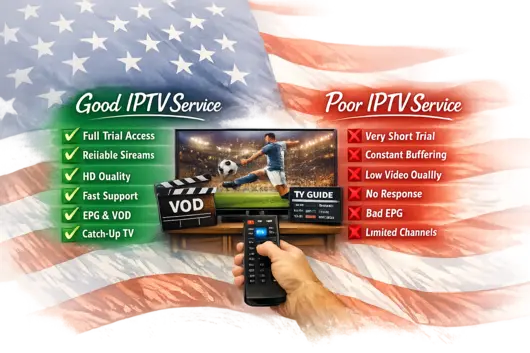
Not every free trial IPTV experience is equal. Some providers offer trials as a genuine service preview. Others use them as a formality, knowing that most users will not test thoroughly. The table below gives you a direct reference for separating one from the other.
Provider Quality: Red Flags vs. Green Flags
| Evaluation Area | Green Flag | Red Flag |
|---|---|---|
| Trial duration | 24 to 48 hours minimum with full access | Less than 12 hours or access to limited channels only |
| Channel reliability | Core channels load consistently every time | Frequent failures on popular or sports channels |
| Buffering | Stable during peak evening hours | Buffering occurs at any time, even on a fast connection |
| Video quality | Picture matches the advertised resolution | Labelled HD but visibly poor quality on screen |
| EPG accuracy | Correct times, full descriptions, 7-day view | Missing, delayed, or displaying wrong programs |
| Support response | Under 5 minutes on chat, under 4 hours on email | No response, or generic automated replies only |
| VOD library | Recent titles, working playback, clean navigation | Old catalog, broken links, no functional search |
| Catch-up TV | Available and working across major channels | Not offered, or only works on a handful of channels |
A provider that checks the green flag column consistently during a free trial IPTV subscription is almost certainly worth paying for.
Frequently Asked Questions About Free Trial IPTV
How long should a free trial IPTV last?
Ideally, a free trial IPTV period should last at least 12 to 24 hours. This gives you enough time to test across multiple days, different times of day, and different devices. A trial shorter than that does not give you a realistic picture of daily performance.
Can I test on multiple devices during a free trial?
In most cases, yes. Most providers allow you to install and test the service on multiple devices during the trial. Check the provider’s terms to confirm how many simultaneous connections are permitted, since this number often carries over into paid subscriptions as well.
What happens when my free trial IPTV ends?
At the end of a free trial IPTV period, your access typically pauses until you choose a paid plan. A trustworthy provider will not automatically charge you without your explicit confirmation. If you have run through the seven tests above and the service delivered, upgrading to a full iptv subscription free trial is a straightforward decision.
Ready to Put This to the Test?
The seven things covered in this article are not complicated. They are just the right questions to ask before committing your money to any IPTV service. Channel quality, streaming stability, video clarity, device compatibility, EPG accuracy, support responsiveness, and on-demand depth together give you a complete picture of what daily use will actually look like.
We offer a free trial IPTV subscription precisely because we are confident in what you will find. No pressure, no tricks, just full access so you can run every test on this list and make an informed decision. When you are ready, the trial is available directly on our website.