
Table of Contents
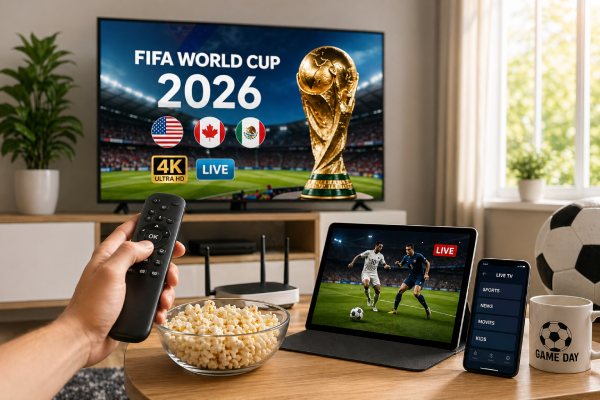
If you want to watch World Cup 2026 without cable, you are not alone, and you are asking the right question at exactly the right time. With the 2026 FIFA World Cup coming to North American soil, hosted across cities in the US, Canada, and Mexico, millions of fans are looking for a smarter way to catch every game without signing back up for a bloated cable package. Sports add-ons alone can run you an extra $30 to $60 a month, and half the time the match you actually want is buried behind yet another tier.
The good news is that watching World Cup 2026 without cable has never been more realistic. Between legitimate free options, paid streaming services, and increasingly popular IPTV subscriptions, you have real choices. This guide breaks all of them down, explains what you actually need to stream in 4K without buffering, and helps you figure out which setup makes the most sense for your household before the opening match kicks off.
Why Watching World Cup 2026 Without Cable Is Easier Than You Think
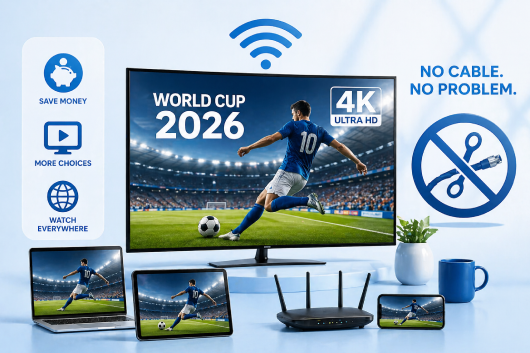
Cord-cutting in the US has been building for years. By 2025, more American households subscribed to streaming services than paid for traditional cable. The shift accelerated partly because of cost, but also because the technology genuinely caught up. Streaming in 4K on a big-screen TV is no longer a technical challenge for most people.
The 2026 World Cup is a particularly strong moment to make the switch. Because games are being played in US cities, broadcast rights are spread across multiple platforms, including some that offer free over-the-air coverage. That means more competition, more access points, and for savvy viewers, a real chance to watch the entire tournament without paying for cable.
What « watching without cable » actually means in practice is simple: you are accessing live video through an internet connection rather than a coaxial cable or satellite dish. The picture quality, reliability, and channel selection available through internet-based options have improved dramatically over the past few years, and for a tournament of this scale, the coverage is genuinely comprehensive.
What You Need Before You Start Streaming
Before you pick a service or app, it helps to check that your setup is actually ready for live sports streaming. A shaky foundation will ruin even the best subscription.
Internet Speed Requirements for 4K Streaming
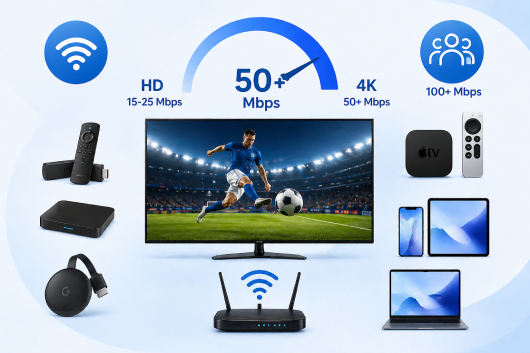
For standard HD streaming (1080p), a consistent download speed of 15 to 25 Mbps is sufficient. If you want true 4K quality, which is available through a growing number of IPTV providers, you should aim for at least 50 Mbps dedicated to your streaming device during match time.
The key word there is « dedicated. » If three other people in your household are also streaming, gaming, or video calling while the match is on, your effective bandwidth drops significantly. A rough guideline for a four-person household during a World Cup match: aim for a total plan speed of 100 Mbps or higher.
Compatible Devices
Most people already own at least one device that works perfectly for streaming live soccer:
- Smart TVs (Samsung, LG, Sony, TCL, and most other brands sold in the last five years)
- Amazon Firestick or Fire TV Cube
- Android TV boxes or Google Chromecast with Google TV
- Apple TV (4th generation or newer)
- Smartphones and tablets (iOS and Android)
- Laptops and desktop computers via browser
IPTV services in particular tend to work well across all of these platforms. Most providers offer dedicated apps or support M3U playlist formats that can be loaded into any compatible media player.
A Stable Connection vs. Wi-Fi Pitfalls
Wi-Fi is convenient, but for live sports it introduces risk. Wireless interference, distance from the router, and network congestion can all cause buffering at exactly the wrong moment. If your TV or streaming box is close enough to your router, a direct Ethernet connection will always give you a more stable experience.
If running a cable is not practical, position your streaming device within clear line-of-sight of your router, and consider upgrading to a Wi-Fi 6 router if you have not already. The difference in stability during high-traffic periods is noticeable.
Your Options to Watch World Cup 2026 Without Cable
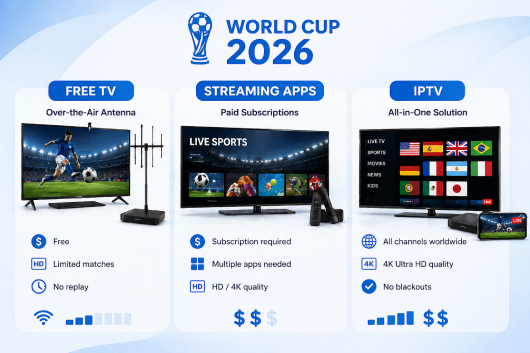
There are three main categories of options available to US viewers. Each has trade-offs worth understanding.
Free Legal Broadcasters
Some World Cup matches will be available through free over-the-air broadcast channels, accessible via a digital antenna. If you live in a major metro area and your TV has a built-in tuner, an antenna is a zero-cost option for catching select games.
The limitations are real, though. Free broadcast coverage typically covers a limited number of matches (usually the later rounds and the final), often in standard HD rather than 4K, and with no on-demand replay functionality. For the group stage, where the majority of matches are played, you will likely need a supplementary option.
Paid Streaming Platforms
Several streaming platforms have secured rights to broadcast World Cup 2026 in the US. Without naming specific brands, these fall into two categories: sports-focused subscription services and general streaming bundles that include live sports as part of their package.
Pros: they are often familiar, have polished apps, and offer reliable quality.
Cons: coverage can be fragmented across multiple services, meaning you may need two or three subscriptions to watch the full tournament. Costs add up quickly, and some platforms throttle quality during peak viewing hours.
IPTV Subscriptions: The Most Complete Option
IPTV (Internet Protocol Television) delivers live TV channels through your internet connection, typically including hundreds or even thousands of channels from around the world. A qualityIPTV subscription gives you access to every broadcaster covering the World Cup simultaneously: US English-language channels, Spanish-language coverage, European broadcasters, and more, all in one place.
For a global tournament like the World Cup, this is a significant advantage. If you want to watch a match the way Brazilian, German, or Argentine fans are watching it, complete with local commentary and atmosphere, IPTV makes that possible. A good IPTV provider will offer the full 2026 World Cup schedule with no blackouts and no geographic restrictions within your subscription.
Many premium IPTV services now offer 4K streams for major sporting events, and the best providers maintain dedicated sports servers to minimize lag during high-traffic broadcasts. This is one area where IPTV has a genuine technical edge over some of the traditional streaming platforms.
What Makes a Good IPTV Subscription for the World Cup
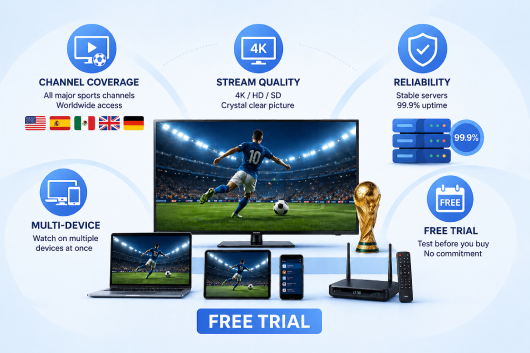
Not all IPTV services are created equal. Here is what separates a quality subscription from one that will let you down at halftime.
Channel Coverage and Sports Packages
For the World Cup specifically, you want a provider that carries all the major US sports broadcasters, Spanish-language sports networks, and ideally a selection of international channels. Verify this before committing. A provider that lists 10,000 channels but cannot confirm World Cup coverage on US-licensed sports networks is not worth your money.
Stream Quality: 4K vs. HD vs. SD
Look for providers that explicitly advertise 4K or UHD streams for live sports, and check whether those streams are available on your specific device. Some providers offer 4K through their Android or Firestick app but not through their web player, for example. When in doubt, test during your free trial period (more on that below).
Reliability During Peak Hours
This is the most important factor for live sports, and the hardest to evaluate from a provider’s marketing page. Server load during a major World Cup match is unlike anything a provider deals with during a Tuesday night broadcast. Ask specifically about server redundancy and uptime guarantees. Read user reviews from other sports viewers, not just general streaming customers.
The best IPTV services invest in dedicated sports server infrastructure precisely because they know match day is different from a regular evening.
Multi-Device Support
A solid IPTV subscription should allow you to stream on at least two devices simultaneously. This matters if you want to have the game on the living room TV while keeping an eye on a second match on your tablet. Check the connection limit before subscribing.
Free Trial Availability
A reputable IPTV provider will offer a free trial. This is your opportunity to stress-test the service before the tournament starts: check 4K quality, test the sports channels you care about, and see how the app behaves on your preferred device. Our service offers a free trial so you can evaluate everything hands-on before committing to a plan.
How to Set Up IPTV in Time for the World Cup
Setting up an IPTV service is less complicated than it sounds. Here is a step-by-step breakdown for the three most common setups.
Step-by-Step: Setting Up on a Firestick or Android TV
- From your Firestick or Android TV home screen, go to Settings, then My Fire TV or Device, then Developer Options.
- Enable « Apps from Unknown Sources » (required for third-party apps).
- Download a media player app that supports IPTV playlists (look for apps with IPTV or M3U in their description in the app store).
- Once your IPTV subscription is active, your provider will send you login credentials or an M3U URL.
- Open the media player app, enter your M3U URL or credentials, and your channel list will populate automatically.
- Navigate to the sports section and verify your World Cup channels are loading.
Screenshots and setup tutorials are typically provided by your IPTV provider in a welcome email or help center. If you run into any issues, customer support should be available to walk you through the process.
Step-by-Step: Setting Up on a Smart TV
- If your Smart TV runs Android TV, the process is similar to the Firestick steps above.
- For Samsung or LG smart TVs, look for a compatible IPTV app in the native app store (search for IPTV or smart IPTV).
- Install the app, enter your M3U URL or subscription credentials, and load your channel list.
- For best performance, connect your TV directly to your router via Ethernet.
Step-by-Step: Setting Up on a Phone or Tablet
- Download an IPTV player app from the App Store (iOS) or Google Play Store (Android).
- Open the app and look for an option to add a playlist or enter an M3U URL.
- Paste the URL provided by your IPTV service.
- Your channels will load within a few seconds.
- Consider using your phone or tablet as a second screen for a different match while the main game runs on your TV.
Tips to Get the Best Picture Quality on Match Day
Even with agreat IPTV subscription, a few simple adjustments can make the difference between a smooth 4K broadcast and frustrating buffering.
Use a wired connection whenever possible. This single change eliminates the vast majority of buffering complaints. A $15 Ethernet cable is worth it.
Restart your router before a big match. Routers can accumulate memory issues over days of continuous use. A fresh restart clears the slate and often improves speeds noticeably.
Close background apps on your streaming device. Other apps running in the background consume RAM and sometimes bandwidth. Before kickoff, close everything you are not using.
Choose the right stream quality in your IPTV app. If your internet connection is not quite fast enough for 4K, selecting 1080p HD will give you a much smoother experience than insisting on a 4K stream that keeps pausing. Most apps let you adjust this in settings.
Schedule streaming during off-peak hours for testing. If you want to verify your setup before the tournament, test it on a weekday morning when internet traffic in your area is lowest. If it works well then, it will work on match day too.
People Also Ask
Can I watch World Cup 2026 for free in the US?
Some matches, particularly later rounds, will be available through free over-the-air broadcast channels if you have a digital antenna. However, full tournament coverage including all group stage matches will require a paid option, whether a streaming service or an IPTV subscription.
What is the best way to stream FIFA World Cup 2026?
For viewers who want complete coverage, 4K quality, and flexibility across devices, an IPTV subscription with a dedicated sports package offers the most comprehensive access. It consolidates all the channels covering the tournament into one place, often at a lower monthly cost than stacking multiple streaming service subscriptions.
Is IPTV legal in the US?
The technology behind IPTV is entirely legal. Delivering television over an internet connection is how most streaming services operate. What matters is whether the content being delivered is properly licensed. Reputable IPTV providers operate within legal frameworks and provide access to licensed channel packages. As with any service, it is worth reviewing a provider’s terms and confirming they operate transparently.
How much does an IPTV subscription cost?
Pricing varies by provider and plan, but quality IPTV subscriptions typically range from $10 to $20 per month, often with discounts available for quarterly or annual billing. This is generally less than the cost of a single sports add-on package through a traditional cable provider.
Will World Cup 2026 be in 4K?
Select matches, including the final and semi-finals, are expected to be broadcast in 4K by at least some rights holders. The availability of 4K depends on both the broadcaster and your streaming platform or IPTV provider. Choosing a provider that explicitly supports 4K sports streams gives you the best chance of watching in the highest quality available.
Why an IPTV Free Trial Makes Sense Before the Tournament Starts
The World Cup only comes around every four years. A poor streaming experience during a knockout stage match is genuinely disappointing, and it is entirely avoidable with a little preparation.
The smartest move you can make right now, with weeks still to go before the tournament, is to test your setup. A free trial from a quality IPTV provider gives you real-world access to the service: the actual channel list, actual stream quality, actual behavior during peak hours. You are not relying on anyone’s marketing claims.
During your trial, open up the sports channels you plan to use for the World Cup. Watch a live match if one is available. Test your 4K stream. Try it on your TV and on your phone. If something does not work the way you expect, you have time to troubleshoot or switch to a different provider before it matters.
We offer a free trial so you can make that evaluation with no commitment. Check the quality, test the channels, and decide for yourself. The World Cup is too good to watch through a buffering wheel.