
Table of Contents
If you have ever sat down after a long day, flipped through five different apps looking for something to watch, and wondered why you are paying so much for so little, you are not alone. A lot of Americans, especially those who have been loyal cable subscribers for decades, are starting to ask a simple question: is there a smarter way to watch TV?
IPTV has been the answer for millions of households. And in 2026, one app keeps coming up in conversations among people who take their streaming setup seriously: IBO Player Pro. Whether you stumbled across it in a forum, heard about it from a neighbor, or just searched around looking for a better way to use your Smart TV, this guide is here to walk you through everything you need to know.
We will cover what the app actually does, how to get it running, what to look for in an IPTV subscription, and whether this combination is genuinely worth your time.
What Is IBO Player Pro and Why Are People Talking About It?
A Quick Look at What the App Actually Does
IBO Player Pro is a media player application designed specifically to work with IPTV services. Think of it as the remote control between your Smart TV and the content you want to watch. On its own, it does not come loaded with channels. It is the vehicle, and your IPTV subscription is the fuel.
What makes it stand out is how cleanly it handles that job. The interface is organized and easy to navigate, even if you are not particularly tech-savvy. You get an electronic program guide, which works like a digital version of the old TV listings you used to find in the Sunday newspaper. You can browse what is on, see what is coming up, and jump between channels without feeling lost.
It also supports multiple user profiles, which is useful if you share your TV with a spouse, a parent, or anyone else who has different tastes in content.
Why It Stands Out From Other IPTV Players in 2026
There are several IPTV player apps available across different platforms, so the natural question is what sets this one apart. A few things are worth noting.
First, stability. IBO Player Pro has built a reputation for reliable performance, meaning fewer crashes and less unexpected behavior during playback. That matters more than most people realize until they have dealt with an app that freezes right at the best part of a game or a movie.
Second, the interface was clearly designed with everyday users in mind, not developers. Menus are straightforward, settings are accessible without digging through complicated options, and the learning curve is genuinely short.
Third, compatibility. The app has been developed to work across a wide range of Smart TV brands and operating systems, which removes a common frustration for people who buy a mid-range TV and find that certain apps simply do not work properly on it.
How IPTV on IBO Player Pro Works on Smart TVs
Which Smart TV Brands and Operating Systems Support It
IBO Player Pro is available on several of the most widely used Smart TV platforms in American homes. This includes Android TV and Google TV devices, which cover a broad range of brands sold at most major electronics retailers. Samsung and LG users can typically access it through their respective app stores or sideload it depending on their model year.
If your TV runs on a more generic Android-based operating system, the installation process is even more straightforward. Amazon Fire TV Stick users can also access it, which means even if your main TV does not qualify, you can still get the experience through an affordable streaming device plugged into an HDMI port.
Before you get started, it is worth checking which operating system your specific TV model runs. You can usually find this in the settings menu under « About » or « System Information. »
Step-by-Step: Getting It Set Up for the First Time
Setting up IPTV on IBO Player Pro does not require a background in technology. Here is how the process typically works.
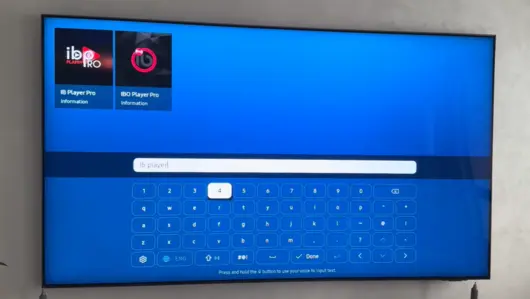
Step 1. On your Smart TV, open the app store. Search for IBO Player Pro. Download and install the app. This is the same process you would use to add any other app to your TV.
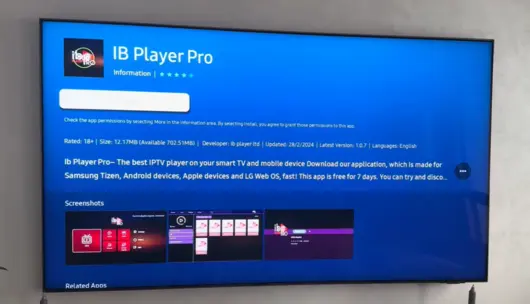
Step 2. Open the app. You will be prompted to enter your IPTV subscription credentials. This usually means a username, a password, and a server URL, all of which your IPTV provider will give you when you sign up.
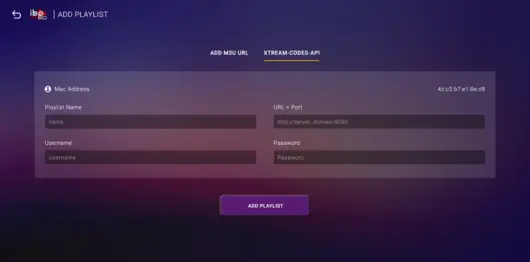
Step 3. Once entered, the app will load your channel list and program guide. Browse through what is available and get familiar with the layout.
Step 4. Adjust any settings you want to change, such as stream quality, parental controls, or preferred language. These options are usually found in the main settings menu.
The whole setup process, from install to watching your first channel, typically takes under ten minutes.
What Your Internet Connection Needs to Look Like
IPTV is streamed over the internet, so your connection quality directly affects your viewing experience. Here are general guidelines worth keeping in mind.
For standard HD content, a download speed of at least 10 Mbps per stream is usually sufficient. For Full HD, 15 to 20 Mbps is more comfortable. If you want to watch in 4K without interruptions, you will want at least 25 Mbps available for that stream alone.
These numbers assume you are not doing anything else that eats up bandwidth at the same time, like a family member gaming online or someone video calling. In households where several devices are active simultaneously, a higher overall speed makes a real difference.
A wired Ethernet connection from your router to your TV will always outperform Wi-Fi for streaming purposes. That said, a strong Wi-Fi signal at close range works well for most households.
What to Look for in an IPTV Subscription Before You Buy
Channel Variety and US-Specific Content
Not all IPTV subscriptions are built the same. The most important thing to evaluate before buying is whether the service actually carries the content you care about. For most American viewers, that means local network channels, sports packages, and news.
A quality IPTV subscription should include a solid lineup of US local and national channels, regional sports networks, and popular entertainment channels. If you follow specific sports leagues, look specifically for a provider that confirms coverage of those networks. Same goes for Spanish-language content, international news, or any niche programming that matters to your household.
Stream Quality: HD, Full HD, and 4K Explained Simply
These terms come up constantly, and they are worth understanding before you commit to a subscription.
HD, or high definition, means 720p resolution. It is a noticeable step up from older standard definition television. Full HD means 1080p, which is crisp and detailed on most living room TVs. 4K is roughly four times the resolution of Full HD and is particularly striking on larger screens, typically 55 inches and above.
Most reputable IPTV providers offer a mix of these quality levels depending on the channel. The best providers let you choose your preferred stream quality within the player settings, so you can balance quality against bandwidth depending on your connection.
Reliability and Uptime: Why This Matters More Than Price
A subscription that goes down every weekend during prime time is not a deal, regardless of how cheap it is. Uptime reliability is one of the most important factors in evaluating an IPTV provider.
Look for providers that are transparent about their server infrastructure and offer some form of customer support. Responsive support is especially useful during sporting events or live programming, when interruptions are most frustrating.
A good way to gauge reliability before committing is to use a free trial, which brings us to the next section.
IPTV Subscription Comparison: What Each Quality Tier Offers
Before you buy, it helps to know what separates a basic subscription from a premium one. This table gives you a clear side-by-side view of the main criteria to evaluate.
| Criteria | Basic Tier | Standard Tier | Premium Tier |
|---|---|---|---|
| Stream quality | SD / 720p HD | Full HD 1080p | Full HD + 4K available |
| Channel count | 1,000 to 3,000 | 10,000 to 18,000 | 20,000+ including regional |
| US local channels | Limited | Most major markets | Full US local coverage |
| Sports coverage | Basic packages only | Major leagues included | Full sports + PPV events |
| Electronic program guide | Not always included | Included | Full EPG with catch-up |
| Customer support | Email only | Email + ticketing | 24/7 live chat + email |
| Free trial available | Rarely | Sometimes | Yes, standard practice |
| Uptime reliability | Variable | Generally stable | 99%+ guaranteed uptime |
Use this table as a checklist when comparing providers. A subscription that scores well across most rows is worth considering. One that struggles on uptime, support, or trial availability deserves more scrutiny before you hand over payment details.
How to Get an IPTV Subscription That Works With IBO Player Pro
The Difference Between a Good and a Bad Provider
The IPTV space has a wide range of providers, and quality varies significantly. A reliable provider will be upfront about what they offer, including channel counts, stream quality options, compatible devices, and trial availability. They will also have some form of support you can reach when something goes wrong.
Warning signs include providers that promise enormous channel counts with no specifics, offer no trial period, have no visible customer support, or require unusual payment methods that offer no buyer protection.
Matching your subscription to IBO Player Pro is generally straightforward since the app accepts standard M3U playlist formats and Xtream Codes, which most reputable providers use. When you contact a provider or sign up, simply ask which format they support and confirm it is compatible with the player.
Free Trials: Why Smart Shoppers Test Before They Commit
This is worth saying plainly: do not skip the free trial.
A free trial gives you the chance to test real-world performance in your home, on your TV, with your internet connection. What works flawlessly in one household might buffer in another depending on your ISP, your router, or your proximity to the provider’s servers.
We offer a free trial that lets you explore the full service before committing to a paid IPTV subscription. This is the right way to buy, and any provider confident in their service should be willing to offer it.
During your trial, watch content at different times of day, try switching between channels quickly, and test the quality during peak evening hours when more people are streaming. That gives you a realistic picture of what you are buying.
What to Expect From the Setup Process
Once you have chosen a provider and received your login credentials, getting started with IBO Player Pro is quick. As outlined earlier, you enter your credentials into the app, wait for the channel list to load, and you are watching.
Most providers send setup instructions along with your credentials. If you run into any issues, a quick search or a message to your provider’s support team will usually resolve things within minutes.
Is IBO Player Pro the Best IPTV App for Smart TVs Right Now?
Honest Pros and Cons
Calling any single app the definitive best is a strong claim, and it is worth being honest about what IBO Player Pro does well and where it has room to improve.
On the positive side, the app is genuinely user-friendly. The electronic program guide works reliably, the interface is clean without being sparse, and multiple profile support adds genuine value for households. Performance is generally strong, and the app is regularly updated.
On the other side, some users on older Smart TV models report occasional compatibility issues, particularly on devices that have not received firmware updates recently. The app’s customization options, while adequate, are not as deep as some power users might want. And like any IPTV player, it is only as good as the subscription paired with it.
Who It Works Best For
IBO Player Pro tends to resonate most with viewers who want a reliable, no-fuss experience. If you are someone who wants to turn on the TV, find your channels quickly, and watch without technical headaches, this app fits that profile well.
It is also well suited for people who are new to IPTV. The setup process is approachable, and the interface does not assume any prior knowledge.
For more advanced users who want highly granular control over stream settings, buffer sizes, and developer-level configuration, there are more technical players available. But for the majority of everyday viewers, IBO Player Pro hits the right balance.
How It Compares in Terms of User Experience
Compared to other popular IPTV players, IBO Player Pro occupies a comfortable middle ground. It is more polished and reliable than many free, generic players, but it does not carry the complexity of applications aimed at technical enthusiasts.
The program guide in particular is a feature that many competing apps handle poorly or skip altogether. Having a proper guide that shows you what is on and what is coming up is something cable subscribers have taken for granted for years, and it is genuinely appreciated when an IPTV app replicates that experience cleanly.
Common Questions About IPTV on IBO Player Pro
Can I Use Any IPTV Subscription With IBO Player Pro?
IBO Player Pro is compatible with any provider that supplies M3U links or Xtream Codes login credentials, which covers the vast majority of reputable IPTV services. When you sign up with a provider, they will give you these details, and you simply paste them into the app. If you are unsure whether a particular provider is compatible, ask them directly before purchasing.
What If the Streams Keep Buffering?
Buffering is the most common complaint in IPTV, and it almost always comes down to one of three things: your internet connection speed, your Wi-Fi signal quality, or your provider’s server load.
Start by checking your internet speed during a buffering episode. If speeds are fine, try switching from Wi-Fi to a wired connection. If buffering only happens at certain times of day, the issue may be on the provider’s side and worth reporting to their support team. Lowering the stream quality setting within the app can also help if your connection is inconsistent.
Is IPTV Legal in the US?
Using IPTV technology itself is completely legal. What matters is the source of the content. Subscribing to a legitimate IPTV service that has proper licensing agreements for the content it distributes is legal, just as subscribing to any other streaming service is legal. The technology is simply a delivery method.
If you have questions about a specific provider’s licensing, that is a fair thing to ask them before subscribing.
Tips for Getting the Most Out of Your IPTV Experience
Router Placement and Wired vs. Wireless
Your router’s location in your home has a bigger impact on streaming quality than most people realize. Wi-Fi signals weaken through walls, floors, and other obstacles. If your Smart TV is on the other side of the house from your router, or separated by several walls, signal quality will suffer.
The most reliable solution is a wired connection. Running an Ethernet cable from your router directly to your TV eliminates Wi-Fi variability entirely. If running cable is not practical, a powerline adapter kit or a mesh Wi-Fi system can significantly improve signal quality in distant rooms.
Using a VPN With IPTV
Some viewers choose to use a VPN alongside their IPTV service. A VPN can help with privacy and can sometimes reduce ISP throttling, which happens when your internet provider slows down streaming traffic during peak hours.
If you use a VPN, choose one known for fast speeds rather than prioritizing cost. A slow VPN can introduce more buffering than it prevents. It is also worth checking that your VPN is compatible with Smart TV apps or whether you would need to install it at the router level.
Keeping the App and Subscription in Sync
IPTV apps and subscriptions are separate products, and occasionally a mismatch can cause issues. If your subscription renews or your provider updates their server information, you may need to re-enter your credentials in the app. Most providers will notify you in advance of any changes.
It is also worth keeping the IBO Player Pro app updated, as updates often address performance issues and improve compatibility with newer TV firmware versions.
Frequently Asked Questions
Does IBO Player Pro work on all Smart TVs?
It works on Android TV, Google TV, and several other platforms. Check your TV’s app store or the app’s official compatibility list for your specific model.
How many devices can I use with one IPTV subscription?
This varies by provider. Most offer packages with one ,or more simultaneous connections. Check with your provider before purchasing.
What happens if my IPTV subscription expires?
The app will stop loading content until you renew your subscription. Your app settings and preferences are usually saved.
Can I record live TV with IBO Player Pro?
Some versions of the app support recording functionality depending on your subscription and TV model. Check the app’s feature list for your platform.
Is there a customer support option if I get stuck?
Yes. Reputable IPTV providers offer customer support via email, live chat, or ticketing systems. Setup help is typically available around the clock.
Final Thoughts
IPTV on IBO Player Pro represents a practical, well-rounded setup for American households looking to move beyond traditional cable. The app handles its job cleanly, the setup process is accessible even for first-time users, and when paired with a quality IPTV subscription, it delivers a viewing experience that rivals or exceeds what most cable packages offer at a fraction of the cost.
The most important step before committing is testing the service yourself. Take advantage of a free trial, run the app on your actual TV, and spend a few days with it before making any decisions. That is the only honest way to evaluate whether it fits your household.
If you are ready to explore what a better TV experience looks like in 2026, start with a free trial today and see it for yourself.